We’ve all been there: you hop into your car, coffee in one hand, phone in the other, and then comes the fumble. You dig for a cable, realize it’s tangled around the gear shifter, or worse, discover the port has become finicky after years of constant plugging and unplugging. While Apple CarPlay has revolutionized how we drive, the "wired" part of the equation feels increasingly like a relic of 2014. In an era of MagSafe charging and wireless earbuds, physical tethers are the ultimate "small friction" that disrupts an otherwise seamless morning commute.
To upgrade wired CarPlay to wireless for under $50, you can use a plug-and-play converter like the Aluratek Combo Wireless Car Adapter, which connects to your vehicle's USB port and pairs via Bluetooth. These compact dongles act as a bridge, tricking your infotainment system into thinking your phone is plugged in while allowing you to keep your iPhone in your pocket or on a wireless charging pad.
The Death of the Cable: Why Wireless is a Game Changer
The shift toward wireless connectivity isn't just about aesthetics; it’s about preserving your hardware and your sanity. Every time you plug in a cable, you’re contributing to the eventual wear and tear of your smartphone’s charging port. For many drivers, the primary motivation to switch is the "constant small friction" of cable management. Cables fray, they get caught in seat rails, and they clutter an otherwise clean dashboard.
Beyond the physical benefits, the true "magic" of a wireless setup is the automatic pairing. Imagine starting your engine and having your Spotify playlist or Waze navigation pop up on the dashboard before you’ve even backed out of the driveway. You no longer have to decide whether a "quick trip to the grocery store" is worth the effort of plugging in.
Wireless CarPlay adapters offer the benefit of cable-free convenience and automatic pairing, though some budget models may experience minor audio latency compared to wired connections. However, for the average commuter, the freedom of a cable-free cabin far outweighs a half-second delay in skipping a song.
The $47 Hero: Aluratek Combo Wireless Car Adapter
If you’ve browsed the aisles of Costco or scrolled through Best Buy’s automotive section recently, you’ve likely seen the Aluratek Combo Wireless Car Adapter. In a market flooded with generic, unbranded dongles, Aluratek has carved out a niche as the reliable budget champion. Currently retailing for roughly $47, it hits that "impulse buy" price point while delivering performance that rivals units twice its price.
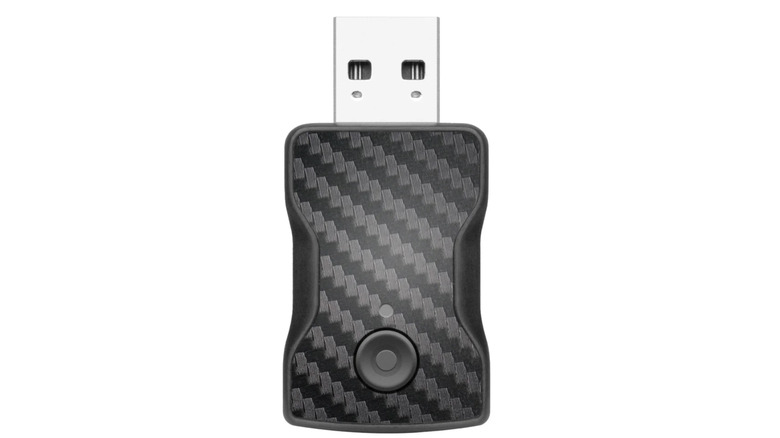
The adapter's reputation is backed by solid data. The Aluratek wireless adapter maintains a 4.3 out of 5-star rating based on over 360 consumer reviews at major retailers like Best Buy. Users consistently praise its "set it and forget it" nature. The device itself is no larger than a matchbox, finished in a sleek matte black that disappears into most center consoles.
| Feature | Aluratek Combo Adapter |
|---|---|
| Price | ~$47.00 |
| Boot Time | 15–20 Seconds |
| Connectivity | 5GHz Wi-Fi + Bluetooth 5.0 |
| Ports Included | USB-A and USB-C Adapters |
| Compatibility | Wired CarPlay Vehicles (2016–2026) |
Step-by-Step: How to Convert Your Wired Setup in 60 Seconds
The beauty of modern conversion kits is that you don’t need to be a mechanic or a software engineer to install them. Setting up a wireless CarPlay adapter involves plugging the device into your car's USB-A or USB-C port, switching it to the CarPlay setting, and pairing it with your smartphone for automatic future connections.
- Identify Your "Smart" Port: Not every USB port in your car transmits data. Look for the one marked with a smartphone icon or the CarPlay logo.
- Plug and Select: Insert the Aluratek adapter. If your car uses the newer USB-C standard, use the included converter. Ensure the toggle switch on the side of the device is set to "CarPlay."
- The Bluetooth Handshake: Open your iPhone’s Bluetooth settings. You will see a device named "Aluratek" or similar. Tap to pair.
- Allow the Handoff: Your phone will ask if you want to use "CarPlay wirelessly." Select "Use CarPlay."
- Wi-Fi Connection: The device uses Bluetooth to find your phone, but it switches to a 5GHz Wi-Fi signal to transmit the heavy data of maps and music. This happens automatically in the background.
Once this initial 60-second dance is done, your phone will remember the adapter. Every time you enter the vehicle with Bluetooth enabled, the system will initialize on its own.
Other Budget Contenders Under $50 for 2026
While Aluratek is a fantastic all-rounder, the 2026 market offers a few other specialized options for those with specific needs.
Ottocast U2-Air
Often found on sale for around $39, the Ottocast U2-Air is widely considered the "speed king" of the budget category. It is specifically optimized for iPhones and is known for having one of the fastest boot times in the industry.
- Pros: Ultra-fast connection; very slim profile.
- Cons: iPhone only (no Android Auto support); firmware updates can be tricky.
Motorola MA1
Originally designed for Android Auto, the Motorola MA1 technology has influenced a generation of budget cross-platform adapters. While its price fluctuates, it remains a gold standard for stability because it uses Google-licensed technology.
- Pros: Exceptional connection stability; low interference.
- Cons: Often sits right at the $50 limit; fixed USB-A cable (requires adapter for USB-C cars).
Performance Realities: What to Expect from Budget Adapters
Let’s be honest: no aftermarket solution is 100% perfect. When you move away from a physical copper wire, you are trading a tiny bit of technical perfection for a massive amount of convenience.
First, let's talk about the "Boot Time." Unlike a wired connection which is near-instant, a wireless adapter needs to power up, find your phone, and establish a Wi-Fi bridge. Most budget adapters take between 15 and 25 seconds to reach the home screen. Usually, by the time you’ve buckled your seatbelt and checked your mirrors, the system is ready to go.
Secondly, there is the issue of "Audio Latency." Because the data is being sent through the air, you might notice a 1–2 second delay when you press the "Next Track" button on your steering wheel. This doesn't affect the GPS or the music quality itself, but it is a reality of the technology.
Despite these minor quirks, the demand for these devices is skyrocketing. Apple CarPlay is currently compatible with more than 800 vehicle models globally, driving the demand for wireless aftermarket conversion kits. Whether you drive a 2017 Honda or a 2024 Ford, these adapters are designed to bridge the gap between "standard" features and "luxury" convenience.
Editor’s Tip: If you live in a crowded city with high electromagnetic interference, look for an adapter that specifically mentions 5GHz Wi-Fi. The older 2.4GHz bands are prone to dropping the connection when you drive past large 5G towers or major intersections.
Buying Guide: What to Look for in a Wireless Dongle
Before you hit "Buy Now," run through this quick checklist to ensure you aren't wasting your $50.
The Compatibility Checklist
- Existing Wired CarPlay: Does your car already have CarPlay? If it doesn't, a wireless adapter will not add it. These devices only convert existing wired systems to wireless.
- OS Version: Your iPhone should be running at least iOS 10, though iOS 15 or newer is recommended for the best stability.
- Power Supply: Some older vehicles have low-voltage USB ports. If your adapter keeps rebooting, you might need a power-boosting "Y-Cable."
- Multi-Driver Support: If you share your car with a spouse, look for an adapter that allows multiple saved phones. Most budget models will simply connect to the last phone it saw.
FAQ
Q: Will a wireless CarPlay adapter drain my phone battery? A: Since your phone is using Wi-Fi and Bluetooth simultaneously, it will use more battery than if it were sitting idle. However, for most commutes under an hour, the drain is negligible. For long road trips, we recommend placing your phone on a wireless charger.
Q: Can I still use my steering wheel controls? A: Yes. High-quality budget adapters like the Aluratek and Ottocast are designed to pass through all factory signals, meaning your volume knobs and "Siri" buttons will work exactly as they did before.
Q: My car has Android Auto but my partner has an iPhone. Can one adapter do both? A: Look for "2-in-1" or "Combo" adapters. The Aluratek Combo mentioned above is specifically designed to handle both platforms, making it the ideal choice for multi-platform households.
Conclusion
Upgrading your car to wireless CarPlay is perhaps the most cost-effective "luxury" upgrade you can make in 2026. For less than the price of a full tank of gas, you can eliminate the clutter of cables and enjoy the seamless experience of a modern infotainment system.
While there are dozens of options on the market, the Aluratek Combo Wireless Car Adapter remains our top budget pick for its reliability and retail availability. It’s a simple, effective solution to a daily annoyance. Stop fumbling with cords and start enjoying the drive—your dashboard (and your charging port) will thank you.