Our Top Picks
- Best Storage Upgrade: Kingston NV3 2230 SSD – Massive capacity and high-speed performance that eliminates the bottleneck of microSD cards for modern AAA titles.
- Best Control Mod: GuliKit Hall Effect Joysticks – The permanent solution to stick drift, using electromagnetic sensors for lifetime precision.
- Best Thermal Solution: JSAUX Cooling Fan – An external active cooler that drops internal temperatures by up to 15°C to prevent thermal throttling.
- Best Productivity Pick: Hexgears A1 Keyboard – A low-profile mechanical keyboard that turns your Deck into a portable workstation.
- Best Utility Tool: Mechanism Deck Mate – A modular mounting system that adds kickstands, battery clips, and wall mounts to your handheld.
| Accessory | Category | Key Benefit | 2026 Relevance |
|---|---|---|---|
| Kingston NV3 SSD | Storage | 6,000MB/s Speeds | Handles massive 2026 game installs |
| GuliKit Hall Effect | Controls | Zero Drift | Extends life of legacy LCD/OLED units |
| JSAUX Cooling Fan | Thermal | 8-15°C Temp Drop | Prevents throttling in heavy titles |
| Hexgears A1 | Input | Mechanical Tactility | Enables "Hybrid" desktop gaming |
| Deck Mate Grip | Utility | Modular Mounting | The "Swiss Army Knife" for mods |
The State of Steam Deck Modding in 2026
By 2026, the Steam Deck has transitioned from a revolutionary handheld to a mature gaming ecosystem. Whether you are rocking the original LCD "legacy" model or the refined OLED version, the hardware remains incredibly capable. However, as 2026’s AAA titles push the limits of mobile silicon, the community has shifted toward a "hybrid gaming" philosophy. We are no longer just playing on the couch; we are docking into monitors, mounting external batteries for long flights, and upgrading internal components to keep pace with modern demands.
The best third-party Steam Deck accessories for 2026 include GuliKit Hall Effect joysticks for drift prevention, the JSAUX Cooling Fan for aggressive thermal management, and the Hexgears A1 mechanical keyboard for desktop-mode productivity. These aren't just cosmetic additions—they are functional upgrades that address the device's aging points and expand its versatility.
1. The Storage Powerhouse: Kingston NV3 2230 SSD
As game install sizes continue to balloon in 2026—with many titles now demanding 150GB or more—relying solely on a microSD card is becoming a recipe for frustration. While the Steam Deck’s SD slot is convenient, it cannot match the raw throughput of the internal M.2 2230 interface.
The Kingston NV3 2230 SSD has emerged as the gold standard for internal upgrades. It boasts sequential read speeds of up to 6,000MB/s. However, it is important to note a technical bottleneck: the Steam Deck (both LCD and OLED) utilizes a PCIe 3.0 interface. While the NV3 is capable of higher speeds on PCIe 4.0 platforms, it will be capped at the Deck’s maximum bandwidth. Despite this, you will still see a night-and-day difference in boot times and asset streaming compared to stock eMMC or standard SD cards.
Pro Tip: SSD Replacement When swapping your SSD, always remember to remove your microSD card first. Forgetting this step is the #1 cause of cracked SD cards and damaged internal slots.
Upgrading to a high-performance SSD offers significant speed boosts, reducing the stuttering sometimes found in open-world games that need to pull data quickly from storage. It is the single most effective way to "future-proof" your handheld for the next few years of gaming.
2. Drift-Proof Controls: GuliKit Hall Effect Joysticks
Stick drift has been the Achilles' heel of handheld gaming for over a decade. Standard analog sticks use carbon-film potentiometers that physically rub against each other, eventually wearing down and sending "ghost" signals to the console. To fix Steam Deck stick drift permanently, users should upgrade to electromagnetic Hall Effect joysticks from brands like GuliKit.
GuliKit’s sensors use magnets to detect movement, meaning there is zero physical contact between the moving parts of the sensor. No friction means no wear and tear, and no wear and tear means no drift—forever. In 2026, as older Steam Decks begin to show their age, this mod has become a rite of passage for serious owners.
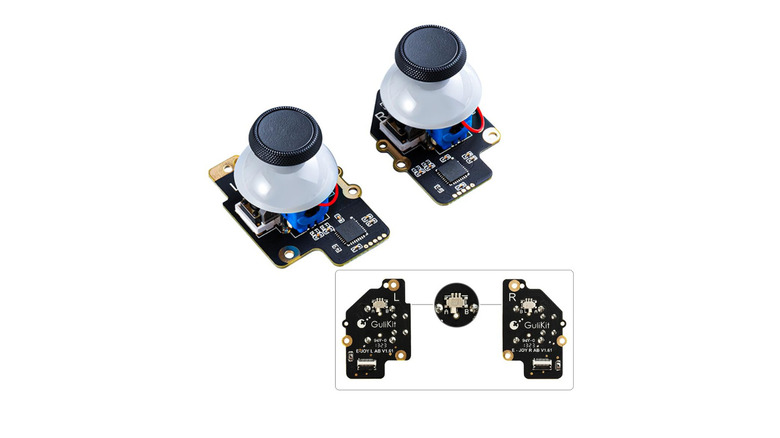
The installation is surprisingly accessible. Unlike many console mods, GuliKit’s kits are designed to be "drop-in," requiring no soldering. You simply open the back plate, disconnect the old stick modules, and screw in the new ones. It’s a 15-minute job that fundamentally changes the feel of the device, offering a smoother, more tensioned response that rivals pro-level controllers.
3. Thermal Mastery: JSAUX External Cooling Fan
Heat is the enemy of performance. As we move further into 2026, newer games are pushing the Steam Deck’s APU to its absolute limit, often resulting in "thermal throttling"—a state where the device slows itself down to prevent damage from overheating. This usually manifests as a sudden, frustrating drop in frame rates after 20 or 30 minutes of play.
The JSAUX External Cooling Fan addresses this by providing an additional path for heat dissipation. Unlike passive cases, this is an active cooling solution that clips onto the back of the Deck. Statistical data shows that external cooling solutions like the JSAUX fan can reduce Steam Deck internal temperatures by 8 to 15 degrees Celsius within just 10 minutes of operation.
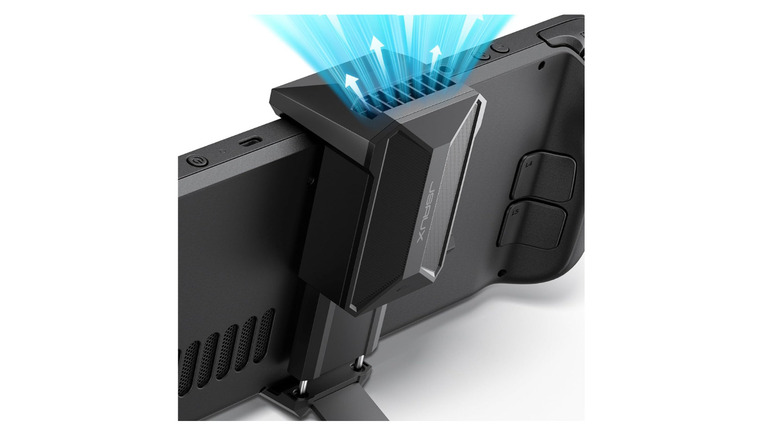
By maintaining a lower thermal floor, the fan allows the Steam Deck to maintain consistent frame rates without throttling. It also doubles as a sturdy portable stand, making it ideal for tabletop sessions where you’re using an external controller. If you find your Deck's internal fan screaming at max RPM during Cyberpunk 2077 or Elden Ring, this is the upgrade you need.
4. Desktop-Class Input: Hexgears A1 Low Profile Mechanical Keyboard
The "Hybrid" gaming trend of 2026 has seen more users utilizing the Steam Deck’s Desktop Mode for more than just installing mods. It is a fully functional Linux PC, and with the right peripherals, it can handle emails, light video editing, or Discord management with ease.
The Hexgears A1 is a 60% layout mechanical keyboard that strikes the perfect balance between portability and performance. It uses Kailh Low-Profile Linear switches, providing that satisfying mechanical "thwack" without the bulk of a full-sized board. For the Steam Deck user, the Bluetooth connectivity is the star of the show, allowing for a cable-free setup that fits easily into a backpack.
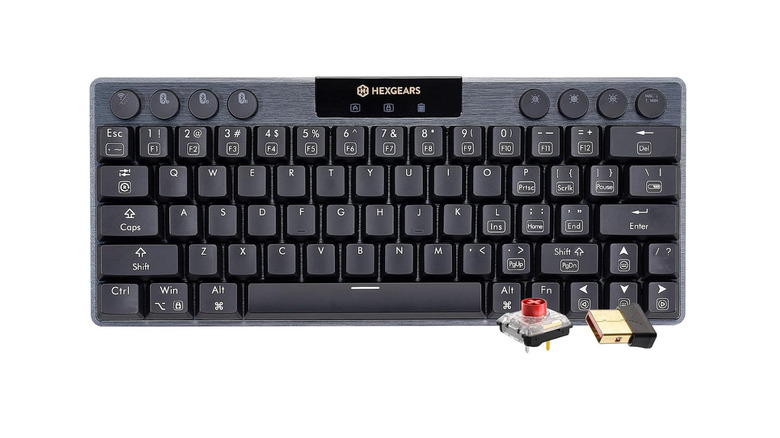
Whether you’re typing out a guide or need precision keys for a strategy game that doesn't play well with joysticks, the A1 transforms the Deck from a "toy" into a tool. Its sleek aluminum build also mirrors the premium feel of the Steam Deck OLED, making it a stylish companion for your mobile desk.
5. Modular Utility: Mechanism Deck Mate Console Grip
If the Steam Deck is the core of your gaming life, the Mechanism Deck Mate is the skeletal system that supports it. This isn't just a case; it’s a modular ecosystem. The system relies on a central grip that adheres (or clips) to the back of the Deck, allowing you to "snap" on various attachments in seconds.
The versatility here is unmatched. You can swap between:
- A robust kickstand for tabletop play.
- A battery pack clip to mount an external power bank for 10-hour flights.
- A wall mount to turn your Deck into a permanent display or smart home hub.
- A phone mount to use your smartphone as a second screen for guides or Twitch chat.
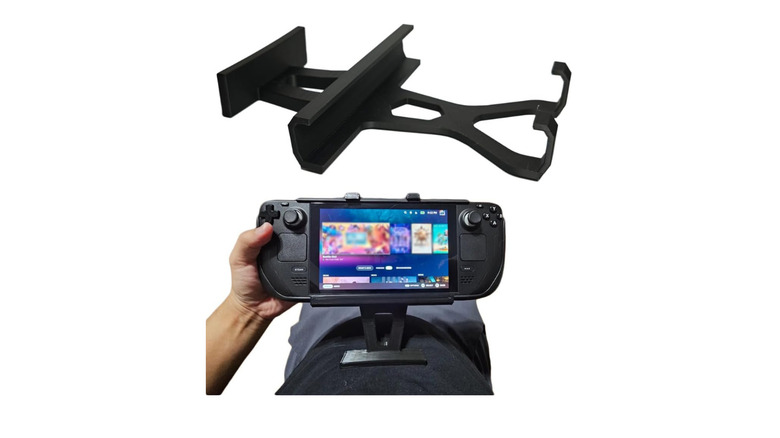
Ergonomically, the Deck Mate helps distribute the weight of the device by allowing you to prop it up on almost any surface. For the power user who treats their Steam Deck like a modular multi-tool, this is the most essential piece of plastic you can buy in 2026.
Comparison: Official Valve Dock vs. Best Third-Party Alternatives
When the Steam Deck first launched, the official Valve Dock was the only reliable way to get a clean video signal to a TV. In 2026, the market has matured, and third-party docks from brands like JSAUX, Ivanky, and UGREEN often offer better value.
While the official dock is a high-quality "plug and play" solution, third-party alternatives have pushed the envelope with:
- Port Selection: Many 2026 third-party docks now include HDMI 2.1 (for 4K/120Hz support on supported monitors) and up to 4 USB-A ports, whereas the official dock is more limited.
- Integrated Storage: Some newer docks actually include an M.2 SSD slot built directly into the base, giving you "docked-only" storage for your massive library.
- Pricing: You can typically find a feature-rich third-party dock for $40-$60, nearly half the price of Valve's official offering.
For most users, a third-party dock provides more flexibility for a significantly lower investment, leaving you more budget for that SSD upgrade.

FAQ
Q: Will installing Hall Effect joysticks or a new SSD void my warranty? A: In the US and many other regions, opening your Steam Deck to replace parts does not automatically void your warranty thanks to "Right to Repair" laws, provided you don't break anything during the process. Valve has even partnered with iFixit to provide official guides. However, always be careful and ground yourself to prevent static discharge.
Q: Is the JSAUX cooling fan loud? A: At its maximum setting, you will hear a noticeable whirring sound. However, because it reduces the internal temperature so effectively, the Steam Deck’s internal fan (which is often much louder and higher-pitched) usually stays at a lower, quieter speed.
Q: Does the Steam Deck support the full 6,000MB/s speed of the Kingston NV3? A: No. The Steam Deck is limited by its PCIe 3.0 interface, which caps out at around 3,500MB/s. You are buying the NV3 for its reliability, thermal efficiency, and capacity, rather than its theoretical peak speeds.
Transform Your Handheld Today
The beauty of the Steam Deck in 2026 is that it is no longer a "static" console. It is a living piece of hardware that grows with you. By investing in high-quality third-party upgrades like Hall Effect sensors or high-speed storage, you aren't just buying accessories—you are extending the lifespan and performance of your favorite gaming device.
Whether you're looking to eliminate stick drift forever or just keep your temps low during a summer gaming session, these five picks represent the pinnacle of Steam Deck modification.